Gmail and Google Workspace Sending Limits, and How to Get Past Them
What is HotHawk?
HotHawk is cold email software used by teams like yours to send high volume cold email.
Special offer
Get 50% more sending, FREE.
50% extra sending on any plan, every month.
On this page
Every cold email operation runs into Google’s sending limits sooner or later. You set up a campaign, it starts sending, and then the mailbox stops with a message about a sending limit you did not know you had. It’s one of the most common walls people hit, and it’s worth understanding before it costs you a domain.
The short version: Gmail and Google Workspace both cap how much you can send in a day, those caps are lower than most people expect, and the cap Google enforces is not even the real limit for cold email. Here’s how all of it actually works.
The short version
- A free Gmail account sends to 500 recipients a day; Google Workspace allows 2,000 emails a day.
- New Workspace accounts start lower, often 500 a day, and ramp up over the first few weeks.
- The real cold email limit is reputation, not Google's cap: sending near 2,000 cold from one mailbox will wreck deliverability long before you hit the ceiling.
- To send more safely, spread volume across many warmed mailboxes and rotate between them, rather than pushing one inbox harder.
The actual Google sending limits
Google sets a hard daily cap on every account, and it resets on a rolling 24-hour basis, not at midnight. Here’s where the numbers sit in 2026:
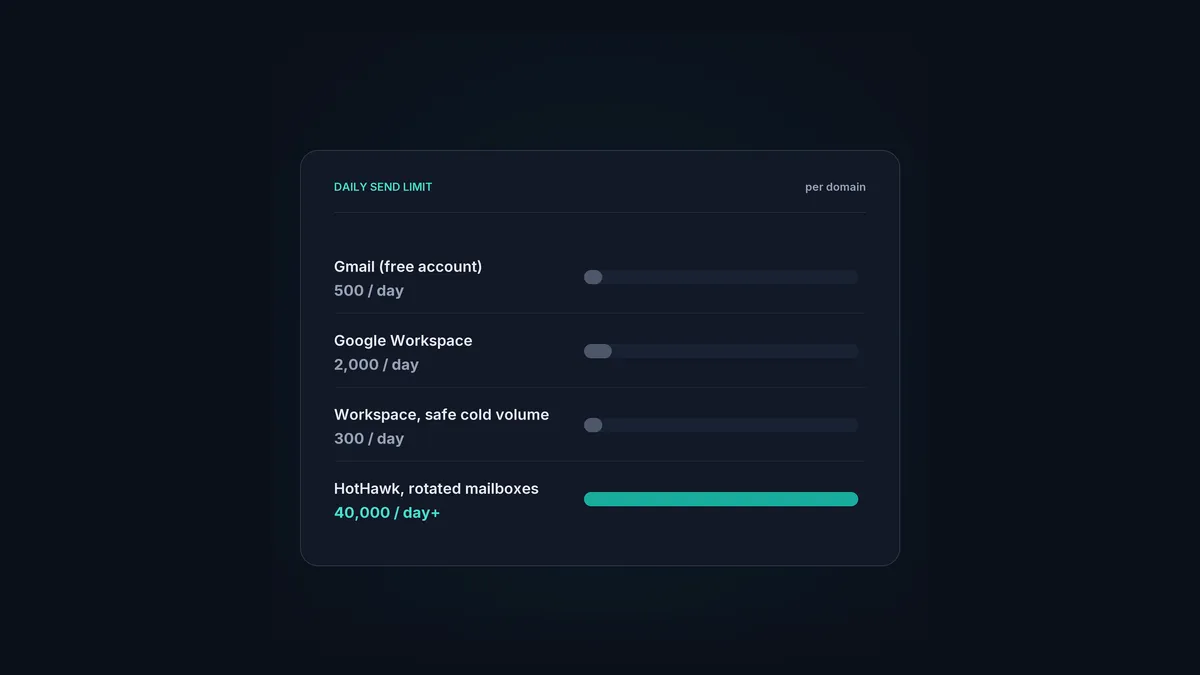
- Free Gmail (a personal @gmail.com account): 500 recipients a day. That counts recipients, so one email to 100 people uses 100 of your 500.
- Google Workspace (a paid business account): 2,000 emails a day, with a limit of 3,000 total recipients a day and up to 2,000 of those external. A single message can go to 500 recipients.
- New or trial Workspace accounts: lower to start, often around 500 a day for the first few days, then rising as the account establishes itself.
Those are the ceilings. Hit them and Google stops the mailbox sending for up to 24 hours, usually with an error like “you have reached a limit for sending mail.” Nothing is broken; the account just goes quiet until the window rolls over.
The limit that actually bites
Here’s the part that catches people out. Google’s 2,000-a-day cap is not the number you should plan around for cold email. It’s the number that gets you filtered.
Those limits were built for normal business email, replying to customers, sending invoices, the odd announcement, from an established account people already engage with. Cold email is the opposite: unknown sender, unprompted, to people who never asked. Push a fresh mailbox anywhere near 2,000 cold sends a day and mailbox providers read it as exactly what it looks like, and your deliverability falls off a cliff well before you reach Google’s ceiling.
The safe number is much lower. A warmed mailbox sending cold can comfortably handle somewhere in the region of a few dozen sends a day, ramped up gradually, not two thousand. So the real constraint is your sender reputation, and Google’s cap is just the outer wall you’ll rarely get near if you’re sending well.
What happens when you hit a limit
If you cross Google’s hard cap, the account is temporarily blocked from sending and recovers on its own within 24 hours. Annoying, but harmless.
If you cross the reputation limit, sending too much cold from an under-warmed mailbox, the damage is quieter and worse. Your mail starts going to spam, your bounce rate climbs, and in a bad case the domain’s reputation takes weeks to rebuild. There’s no error message for this one; you just notice replies drying up. That’s the limit worth respecting.
How to send more, the right way
If a few dozen a day per mailbox is the safe ceiling, and you need to send thousands, the answer isn’t to push one mailbox harder. It’s to send from many.
The approach that works is straightforward in principle:
- Use multiple mailboxes, each one warmed and kept to a modest daily volume.
- Spread your sending across them so no single inbox carries too much, which is called inbox rotation.
- Keep each mailbox warmed so its reputation stays healthy while it sends.
Ten warmed mailboxes each sending a safe volume will comfortably out-send one mailbox being pushed to Google’s limit, and they’ll reach the inbox while doing it. That’s the whole trick behind high-volume cold email: not bigger limits, more inboxes, sent well.
Doing it by hand across ten or fifty mailboxes is a headache, which is where a tool earns its keep. HotHawk warms your mailboxes on real Google and Microsoft inboxes and rotates sending across all of them automatically, so you can send 40,000 a day and more without any single inbox going near a limit, Google’s or its own.
Scale past the limits without burning a domain
HotHawk spreads your sending across many warmed mailboxes with automatic inbox rotation, so you get the volume without pushing any one account past its safe limit.
See how inbox rotation worksA few common questions
How many emails can Google Workspace send per day? 2,000 emails a day, with a cap of 3,000 total recipients and up to 2,000 of them external. New accounts start lower and ramp up. For cold email specifically, though, you should send far below that per mailbox to protect deliverability.
What is the sending limit for a free Gmail account? 500 recipients a day. It’s counted by recipient, so a single email to 200 people uses 200 of the allowance. Free Gmail isn’t built for cold outreach, so it’s a poor base for it regardless of the number.
Can I increase my Gmail or Workspace sending limit? Not really. The caps are fixed by Google, though new Workspace accounts rise from a lower starting point as they establish. The way to send more is to add mailboxes and rotate between them, not to lift a single account’s ceiling.
How long does a Gmail sending block last? Up to 24 hours. Once the rolling window passes, the account can send again. It’s a temporary pause, not a permanent penalty, though repeatedly hitting it is a sign you’re sending too much from one place.
Google’s limits aren’t the problem most people think they are. The hard cap is easy to avoid, and the reputation limit underneath it is the one that actually decides whether your cold email works. Send modest volume from many warmed mailboxes with inbox rotation, and the limits stop being a wall you keep hitting.
