AI SDR Deliverability: The Checklist Before You Let It Send
What is HotHawk?
HotHawk is cold email software used by teams like yours to send high volume cold email.
Special offer
Get 50% more sending, FREE.
50% extra sending on any plan, every month.
On this page
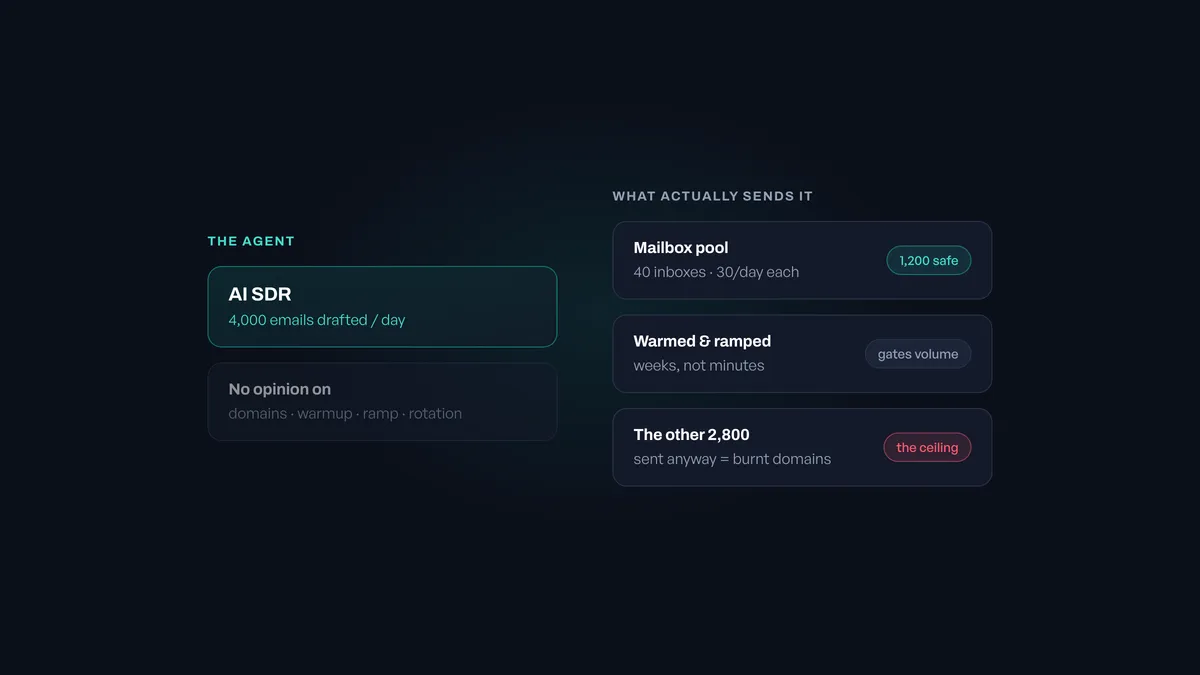
An AI SDR will happily draft four thousand emails before lunch. Your mailboxes will not send four thousand emails before lunch, not safely, and the gap between those two numbers is where most AI SDR projects quietly fall over.
This is the part nobody demos. The agent research is genuinely good now, the personalisation is better than most humans manage at volume, and none of it matters if the mail arrives in spam. The AI has no opinion about your domains, your warmup, or how fast you ramped. It just writes. What sends is the infrastructure underneath, and that has the same limits it always had.
So before you turn the volume up, here’s the checklist.
The short version
- An AI SDR raises your drafting capacity, not your safe sending capacity.
- Safe volume is mailboxes x daily limit, and nothing the AI does changes it.
- Mailbox type decides whether you can warm them at all.
- Ramp is measured in weeks; the agent is ready in minutes.
- Bounce handling and reply handling matter more at AI volume, not less.
1. Work out your real ceiling first
Before anything else, do the arithmetic, because it is the whole problem in one line:
Safe daily volume = number of healthy mailboxes x safe sends per mailbox.
A warmed mailbox on a decent domain sends somewhere around 30 to 50 cold emails a day without drawing attention. Say 30 to be sensible. Forty mailboxes gets you 1,200 a day. That is your ceiling, and your AI SDR does not raise it by a single email.
If the agent is drafting 4,000 a day, you have three options, and only three. Send 1,200 and queue the rest. Buy more mailboxes. Or send 4,000 anyway and burn the domains, which is the option most people pick by accident because nothing in the tool stops them.
Work out the number before you start. It tells you how many mailboxes to buy, and it turns “the AI SDR isn’t working” into a question you can answer.
2. Buy the right kind of mailbox
Mailbox type decides what you can do later, and it is very hard to undo once you have bought fifty of the wrong thing.
Providers sell two different products. Some sell real Google Workspace or Microsoft 365 accounts. Others sell mailboxes on their own SMTP infrastructure, which is cheaper and perfectly legitimate for sending. The difference bites when you try to warm them: a Google or Microsoft mailbox connects over OAuth and can join a warmup pool of other real business inboxes, and an SMTP mailbox cannot, because it is not one of those accounts.
We have ranked the providers and stated the type for each on the best cold email inbox providers. The short version is that if warmup is part of your plan, settle the mailbox type before you compare prices, because the cheapest mailbox you cannot warm is not cheap.
3. Check what the warmup pool is actually made of
Not all warmup is the same thing, and the marketing makes them sound identical.
What you want is engagement from real business inboxes on the providers you are trying to reach. If you are selling B2B, signals from real Google Workspace and Microsoft 365 accounts are worth having, because those are the systems judging your mail. Engagement from a consumer account, an SMTP relay or a bot network is weaker signal for the same effort, and some of it is no signal at all.
Most tools will not tell you what their pool is made of. Ask anyway. We go through the mechanism in why the warmup pool decides everything, and how email warmup works covers the basics underneath it.
One thing worth settling early: “pre-warmed” is not the same as warmed. A mailbox warmed before you owned it has no history of your sending pattern, your volume or the people you actually email. It is a head start, not a finished job. Pre-warmed mailboxes goes through what that does and does not buy you.
4. Ramp on the infrastructure’s clock, not the agent’s
This is where AI SDRs cause the most damage, and it is entirely a timing problem.
Setting up the agent takes an afternoon. Getting forty mailboxes from new to safely sending takes weeks. Those two timelines have nothing to do with each other, and the agent being ready creates enormous pressure to start sending at volume on mailboxes that are not ready for it.
A new mailbox should start low, a handful of real sends a day, and climb gradually over two to four weeks while warmup runs alongside. Domains want a similar run-up. There is no way to compress this: providers are watching for exactly the pattern of a brand new domain suddenly sending hundreds of cold emails, and an AI SDR is very good at producing precisely that pattern.
Plan the ramp as part of the project, not as a thing you discover afterwards.
5. Rotate, and rotate across domains
With volume split across many mailboxes, inbox rotation is what keeps each one inside its own limits. The campaign sends from the pool rather than from one address, so forty mailboxes each send thirty instead of one mailbox sending twelve hundred.
Two things people get wrong here:
- Rotating across mailboxes on one domain is not much protection. Reputation attaches to the domain as well as the mailbox, so ten mailboxes on one domain share a fate. Spread across several domains.
- Rotation is not a reason to skip warmup. It spreads load; it does not create reputation. A pool of cold mailboxes rotates its way into spam just as efficiently.
We go into the mechanics on inbox rotation for cold email.
6. Handle bounces faster than the agent sends
At AI volume, a bad list does damage quickly, because the agent does not pause to wonder whether the data is any good.
Verify before sending, not after. Watch the bounce rate per mailbox rather than per campaign, because one bad domain in your pool will hide inside a healthy average until it takes the rest down with it. And make sure something stops a mailbox automatically when it starts bouncing, rather than relying on somebody noticing in the morning report. Between a human noticing and an agent sending, the agent wins.
The same goes for the mailbox health itself: a mailbox that starts looking risky wants pulling out of the pool rather than nursing.
If you are building the agent yourself rather than buying one, this is the part worth automating properly: the warmup API lets you connect mailboxes, start and pause warmup and read status from your own code, so the warmup state and the sending decisions stay in one system rather than two.
7. Have somewhere for the replies to go
The part that gets forgotten. If the AI SDR works, replies come back, and they come back across every mailbox in the pool rather than to one address.
Forty mailboxes means forty inboxes to watch, and the interesting replies are rarely the straightforward ones. They are forwarded to a colleague, CC’d to a buying committee, or sent from an address that never received your original email. Those are the ones worth money, and those are the ones that get lost when “checking the inboxes” is somebody’s morning job.
Pull them into one place, and route each to whoever should answer. That is what HotHawk’s Master Inbox does, and it is the half of the AI SDR story that most of the category skips entirely, because drafting is easier to demo than following up.
The honest summary
An AI SDR changes how fast you can write. It changes nothing about how fast you can safely send, and the second number is the one that decides whether any of it works.
Get the mailboxes right, warm them against real business inboxes, ramp on the infrastructure’s timetable, rotate across domains, kill bad mailboxes automatically, and put the replies somewhere a human will actually see them. Do that and the agent is genuinely useful. Skip it and you have bought a very sophisticated way to burn forty domains at once.
If you want to work out the numbers for your own setup, the warmup calculator will tell you how much warmup volume your sending actually needs, and the AI SDR guide covers the rest of the picture.
